
This is a test.
On this line I shall adjust the test to be 24 pt, and see how it looks when the message is actually published. (<--- does this text look really big to you, it should, it is set as 24 pt).
It looks okay, big 24 pt in preview mode.
Image of the message editing window in HTML mode, all looks good, I can control the text size.
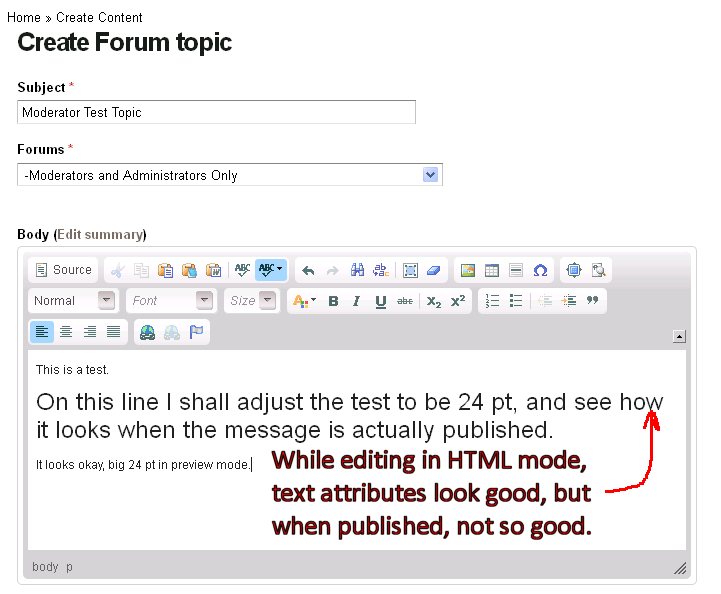
Image of the same message once "published", viewed in Firefox 23.
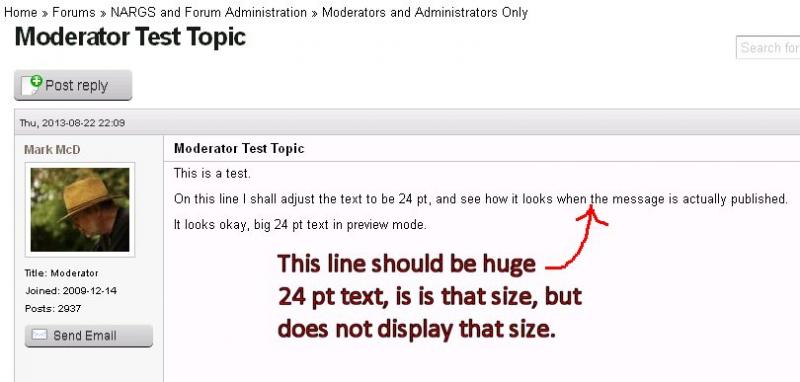
If editing the same message, if one watches carefully, the text window temporarily displays the HTML encoding and the font adjustment is indeed there (per the HTML codes), it is just that the NARGS Drupal environment ignores it. From that point forward, NARGS Forum ignores the desired text size. It also still ignores text Color, Underlining, and Strikethrough. These bugs have been reported a number of times, and said to be fixed at least twice. We're going in circles here. I have tested this under 5 different browsers and builds.
Comments
Mark McDonough
underline
Thu, 08/22/2013 - 8:06pmunderline
strikethrough- not available on new NARGS Forum so far [Now it's working, as of 8/26/13]font size - seems like it's available, but changed font size will not display
font color is red - seems like it's available, but changed text color will not display
Daniel Dillon
Testing the text editor.
Mon, 08/26/2013 - 6:16amTesting the text editor.
dddddddddThe Full HTML format is now available for Active Members. The style directives are not stripped from content in the Full HTML format as they are in the Filtered HTML format. Strikethrough will work in the Full HTML format.
Mark McDonough
underline
Mon, 08/26/2013 - 6:35amunderline
strike-throughfont size - 24 pt
font color - red normal size text
font color - red 26 pt text
yellow background color - Text formatting features are working now :-)